
Policy conflict audit
Macro vs Help Center Policy Audit: Find Conflicts Before AI Launch
A policy conflict audit to compare macros, help docs, and SOPs and find contradictions that become AI wrong answers.
Support Readiness Lead, Meihaku · May 11, 2026
The most common source of AI support wrong answers is not model failure. It is policy conflict: the macro promises one thing, the help center says another, and the SOP adds a third rule that only agents know.
This audit turns policy-drift and gap-detection review into a conflict table, a source-fix backlog, and a launch boundary that keeps contradictory intents out of AI scope until they are resolved.
Use it before launching any AI support agent that retrieves from both public help centers and private macro or SOP libraries.
What this helps decide
Turn Macro vs Help Center Audit into launch scope.
Use this guide to decide which customer intents are approved for AI, which need restrictions, which need source cleanup, and which should stay human-owned.
Evidence used
Sources, policies, and support artifacts
- HappySupport: knowledge base AI readiness audit
- Help.center: AI knowledge support article
- Zendesk: preparing your help center for generative AI
Review output
Approve, restrict, block, or hand off
- Audit setup
- Conflict resolution
- Launch output
How this guide was built
3 public references, 6 review areas
- Map the three source layers
- Find contradictions in high-risk topics
- Build the conflict table
Map the three source layers
Start by mapping every high-volume customer intent to its sources across three layers. The public help center is what customers see and what the AI will likely retrieve first. The macro library is what agents paste into tickets, often with faster edits and less review. The SOP or policy document is the internal rulebook that may contain exceptions, approvals, and workflows not written for customers.
Each intent should have one canonical source. If it has two or more that disagree, the intent is not ready for AI automation.
- Public help center: customer-facing articles, FAQs, and guides.
- Macro library: canned responses, quick replies, and agent snippets.
- SOP/policy: internal rules, exceptions, approvals, and workflows.
- Canonical source: the one approved answer the AI should use.
Find contradictions in high-risk topics
Not every contradiction matters equally. A mismatch in branding tone is low risk. A mismatch in refund window, eligibility rule, cancellation policy, data retention, or account recovery is high risk. Focus the audit on topics where a wrong answer creates customer harm, legal exposure, or financial loss.
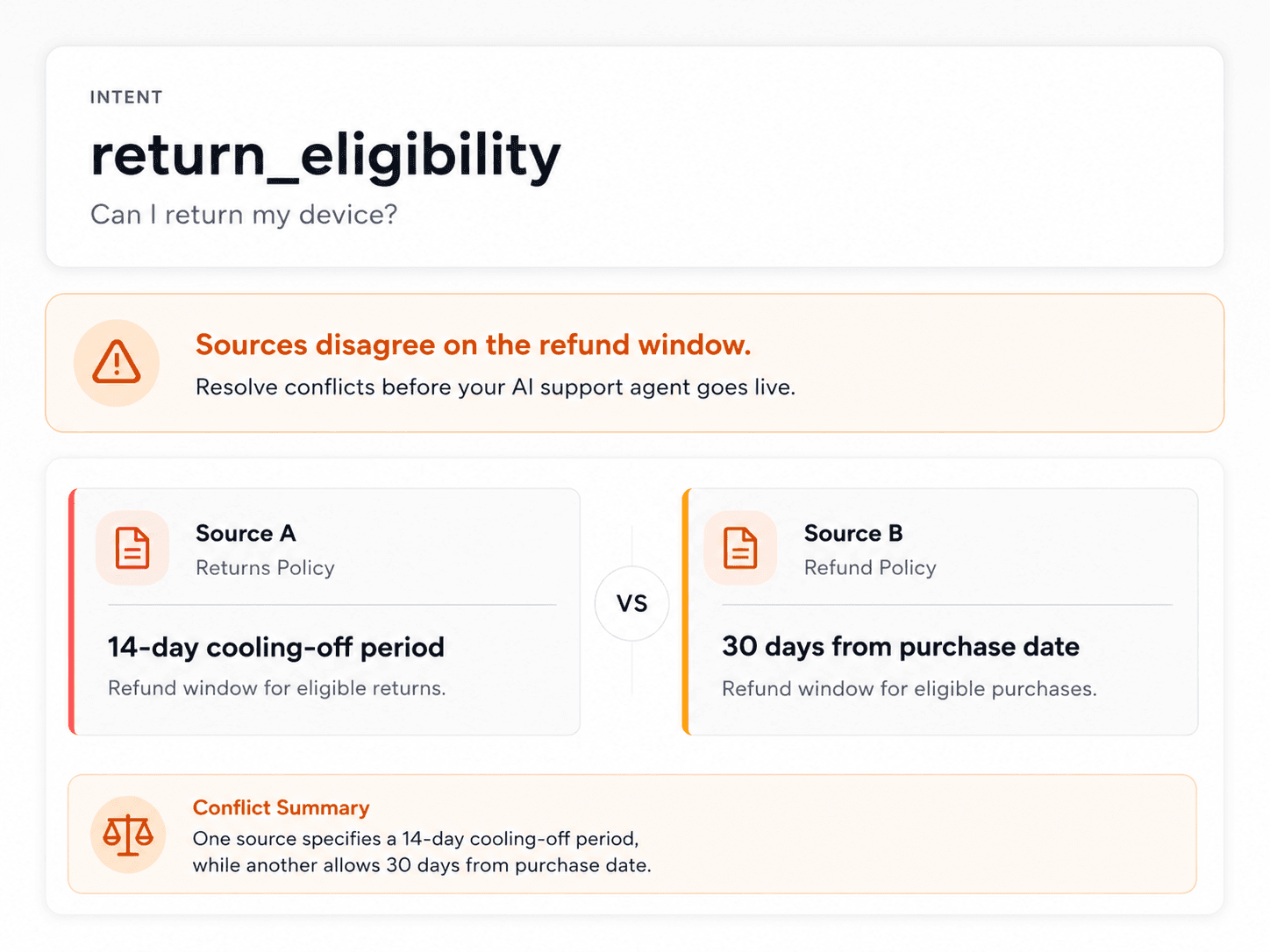
Common high-risk contradictions include: the macro says full refund while the help center says case-by-case; the SOP allows a manager override while the public policy does not mention it; the macro promises a credit while the billing system cannot issue one.
- Refund and credit rules.
- Cancellation and downgrade windows.
- Eligibility and plan conditions.
- Privacy, security, and account-control workflows.
Build the conflict table
The conflict table is the core audit artifact. Each row names the customer intent, the conflicting sources, the policy owner, the customer-safe answer, the resolution action, and the retest trigger. This turns a vague worry into a named, owned, timed fix.
Without a conflict table, teams often discover contradictions only after a customer complains or after the AI gives a wrong answer at scale.
- Customer intent and risk category.
- Conflicting source A and source B.
- Policy owner and decision deadline.
- Customer-safe canonical answer.
- Resolution action: rewrite, archive, approve exception, or create new source.
- Retest prompt and launch state after fix.
Decide which source wins
When sources conflict, someone must choose the canonical answer. This is a business decision, not a model decision. The policy owner, legal reviewer, or support lead should choose the customer-safe version and retire or rewrite the conflicting source.
Do not let the AI reconcile contradictions. The AI may average conflicting sources into a middle ground that satisfies no one and violates policy.
- Assign a canonical source owner for each conflict.
- Require legal or compliance review for regulated topics.
- Archive the losing source or add a redirect to the canonical answer.
- Retest the intent with the same customer phrasing after the fix.
Turn conflicts into launch states
The audit should end with a launch decision for every conflicting intent. Approved means the conflict is resolved and the canonical source is current. Restricted means the intent is answerable only with additional context. Blocked means the conflict is unresolved and the intent should stay out of AI scope. Source-fix-needed means a fix is in progress. Human-only means the intent requires judgement even when sources agree.
This launch map becomes the boundary for vendor configuration, test sets, and QA sampling.
- Approved: conflict resolved, canonical source current and tested.
- Restricted: answerable only after required context is known.
- Blocked: unresolved conflict; keep out of AI scope.
- Source-fix-needed: fix in progress; retest after completion.
- Human-only: judgement-heavy or regulated even without conflict.
Feed the source-fix backlog
Every blocked or source-fix-needed intent should become a work item. The backlog should include the exact source to rewrite, the owner, the deadline, the customer-safe wording, and the retest prompt. Sort by launch impact rather than document count.
A single resolved refund contradiction can unlock a high-volume intent. Twenty fixed typos do not unlock any intent.
- Link each backlog item to the customer intent it unlocks.
- Assign owners and deadlines.
- Include customer-safe canonical wording.
- Attach the retest prompt that proves the fix.
Checklist
Use this as the working review before launch.
Audit setup
- Export top customer intents from tickets and chats.
- Map each intent to help center, macro, and SOP sources.
- Flag intents with two or more sources that disagree.
- Weight refund, billing, privacy, account, and compliance topics higher.
Conflict resolution
- Assign a canonical source owner for each conflict.
- Require legal or compliance review for regulated topics.
- Archive or rewrite conflicting sources.
- Record the customer-safe canonical answer.
Launch output
- Mark each intent approved, restricted, blocked, source-fix-needed, or human-only.
- Export conflict table and source-fix backlog.
- Retest affected intents after every source change.
- Update launch map when new conflicts are found.
How Meihaku helps
Turn the checklist into a launch audit.
Meihaku reads your sources, maps them to customer intents, drafts cited answers, and shows which topics are cleared for AI, blocked, source-fix needed, or human-only.
Related guides
Keep clearing answers before launch.
These pages connect testing, knowledge-base cleanup, and readiness scoring into one pre-launch workflow.
Zendesk AI readiness
Zendesk AI Readiness Audit
Audit Zendesk Guide, macros, ticket history, and policy documents before Zendesk AI answers customers.
Vendor pageIntercom Fin readiness
Intercom Fin Readiness Audit
Audit your Intercom Fin rollout before customers see it. See which intents are cleared for Fin, which need source cleanup, and which should stay human-only.
Vendor pageGorgias AI readiness
Gorgias AI Readiness Audit
Audit your Gorgias AI rollout before it handles refund, order, shipping, and product questions.
Vendor pageFreshdesk AI readiness
Freshdesk Freddy AI readiness audit
Use this readiness workflow to check whether Freshdesk solution articles, ticket patterns, Freddy AI Agent knowledge sources, and workflows can safely support AI answers.
Vendor pageSalesforce AI readiness
Salesforce Service Cloud AI readiness audit
Use this readiness workflow to check whether Salesforce Knowledge, Service Cloud cases, Agentforce actions, and support policies are safe for customer-facing AI.
Vendor pageHubSpot Customer Agent readiness
HubSpot Customer Agent readiness audit
Use this readiness workflow to check whether HubSpot content, public URLs, tickets, and Service Hub knowledge are ready to ground Breeze-powered customer agent answers.
Vendor pageHelp Scout AI readiness
Help Scout AI readiness audit
Use this readiness workflow to check whether Help Scout Docs, AI Answers knowledge sources, Beacon flows, and support conversations are safe for customer-facing AI.
Vendor pageGoogle Docs readiness
Meihaku for Google Docs
Use Meihaku to audit support policies, SOPs, macros, and FAQ documents stored in Google Drive before an AI support agent relies on them.
Vendor pageNotion readiness
Notion support knowledge readiness audit
Use this readiness workflow when support policies, SOPs, FAQs, release notes, and escalation guidance live in Notion before AI support launch.
Vendor pageConfluence readiness
Confluence support knowledge readiness audit
Use this readiness workflow when support policies, troubleshooting articles, SOPs, and internal knowledge base spaces live in Confluence.
Vendor pageAI support readiness template
AI support launch checklist
A vendor-neutral CSV checklist for deciding which customer intents are approved, restricted, blocked, or human-only before an AI support agent goes live.
TemplateAI agent testing template
AI agent testing framework
A vendor-neutral CSV template for testing customer-facing AI agents by intent, source evidence, policy fit, escalation behavior, reviewer workflow, and launch state.
TemplateAI support risk template
AI support risk register
A CSV risk register for support teams deciding which insurance, telehealth, ecommerce, and cross-industry customer intents can safely be automated.
TemplateZendesk AI checklist
Zendesk macro audit
A checklist for turning Zendesk Guide, shared macros, ticket patterns, and internal policies into approved, restricted, blocked, and source-fix decisions.
TemplateKnowledge-base audit
Knowledge Base AI Readiness Audit
A step-by-step AI knowledge base audit for finding stale articles, policy conflicts, missing intents, weak citations, and unsafe automation scope.
ReadDocumentation checklist
AI-Ready Documentation Checklist
A documentation checklist to audit help docs, macros, SOPs, and policies for decay, conflict, and safe AI launch scope.
ReadDocumentation decay
Documentation Decay
A documentation decay guide for AI support launches, focused on stale sources, policy drift, translation lag, macro conflicts, and safe automation scope.
ReadHelp center scorecard
Help Center Readiness Scorecard
A scanner scorecard to grade help center pages for AI readiness across coverage, decay, conflict, and safe automation scope.
ReadAudit template
Chatbot Knowledge Base Audit
An audit-report template for grading and exporting a chatbot knowledge base audit with launch scope decisions and source-fix backlog.
ReadAI support readiness score
AI Support Readiness Score Methodology
A practical scoring method for support teams deciding whether their knowledge base, policies, tests, and handoff rules are ready for customer-facing AI.
ReadAI support risk register
AI Support Risk Register
A support-specific guide to using a risk register before AI agents answer insurance, telehealth, ecommerce, and other sensitive customer questions.
ReadFAQ
Common questions
What is a macro vs help center policy audit?
It is a comparison of macros, help center articles, and SOPs to find policy contradictions that could cause AI wrong answers, followed by a launch decision for each affected customer intent.
Why do macros conflict with help centers so often?
Macros are edited faster than help articles and often contain agent workarounds, temporary exceptions, or outdated promises that were never synchronized back to the public knowledge base.
Should the AI use macros as sources?
Only if the macro is current, customer-safe, and consistent with the canonical help article or policy. Conflicting macros should be blocked from AI retrieval until resolved.
How does Meihaku run this audit?
Meihaku maps customer intents to help articles, macros, and SOPs, flags contradictions, assigns canonical source owners, and turns conflicts into launch states and a source-fix backlog.
Sources
Vendor documentation and public references that ground the claims in this guide.