
AI support risk register
AI Support Risk Register: Template and Examples Before Launch
A support-specific guide to using a risk register before AI agents answer insurance, telehealth, ecommerce, and other sensitive customer questions.
Support Readiness Lead, Meihaku · May 9, 2026
An AI support risk register is the launch-control artifact for customer-facing AI. It turns vague worries about hallucinations, policy mistakes, refunds, clinical advice, privacy, and account access into named customer intents with owners, source evidence, controls, and a launch decision.
Generic project risk registers are useful for delivery teams, but they miss the support-specific question: should an AI agent be allowed to answer this customer right now? The register should make that decision visible before the answer reaches a real customer.
Use the register beside vendor-native testing in Intercom Fin, Zendesk AI, Gorgias AI, Salesforce Agentforce, Freshdesk Freddy AI, HubSpot Customer Agent, Kustomer AI, or a custom support agent. The vendor test shows how the agent behaves. The risk register records whether the support operation is ready to let it answer.
Start with customer intents, not abstract risks
The useful unit of risk is not AI, policy, or hallucination. It is the customer intent that might be answered incorrectly, incompletely, or without the right handoff. Start from recent tickets, chats, macros, help-center searches, and high-risk edge cases.
Each row should name the intent in support language. A row such as refund risk is too vague. A row such as customer asks for a refund after a delayed shipment but outside the published return window is specific enough to test, source, approve, restrict, or keep human-owned.
- Use real customer phrasing from the last 60 to 90 days.
- Add low-volume, high-impact intents manually.
- Split routine FAQ intents from account-specific or regulated intents.
- Preserve ambiguous wording instead of rewriting it into demo prompts.
Record the source evidence behind each decision
A risk register should force evidence into the conversation. If a support team cannot point to a current help article, macro, SOP, policy document, product page, security rule, or approved answer, the intent is not ready for broad automation.
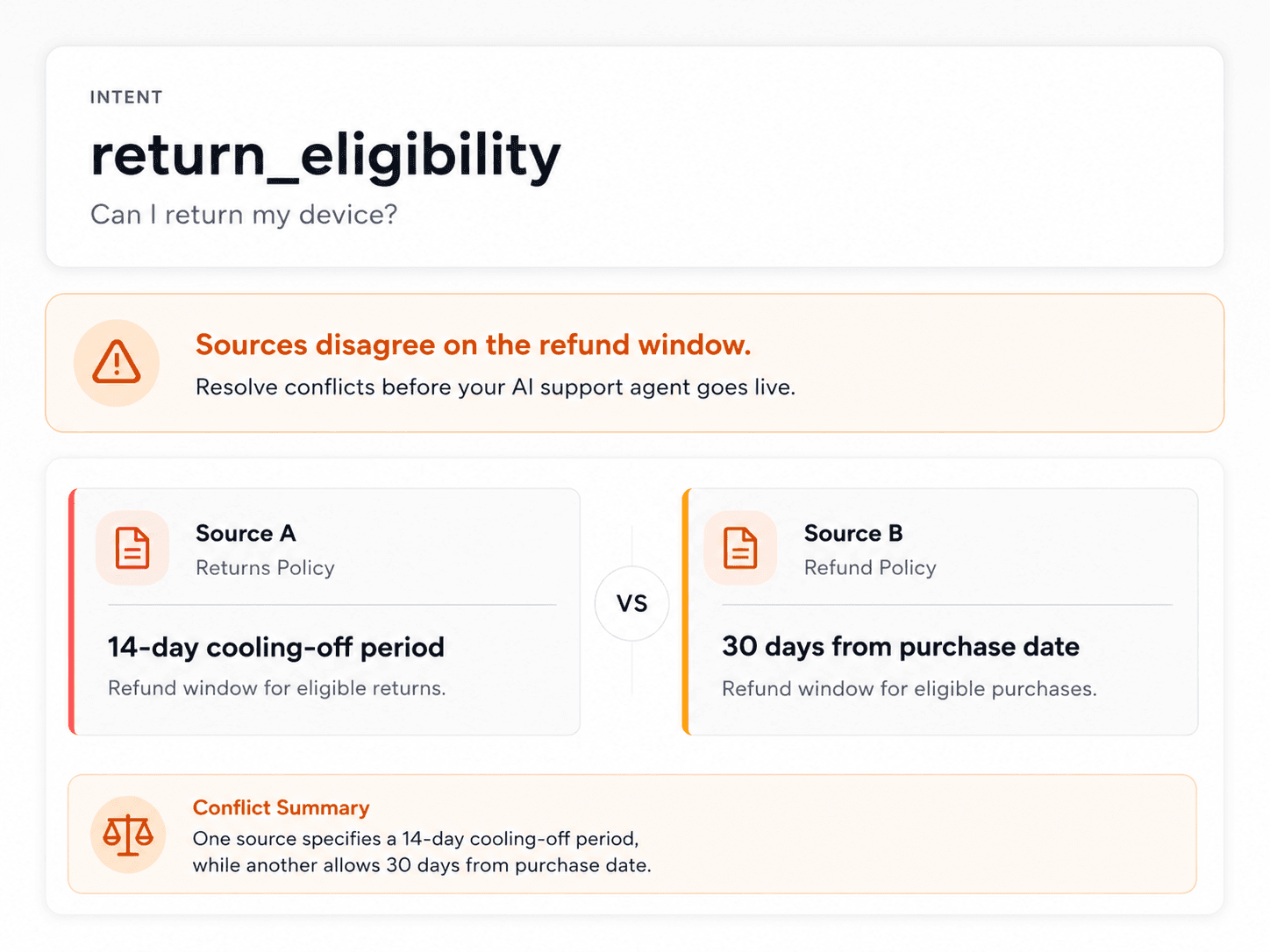
Source conflicts should be treated as launch blockers. AI agents often blend nearby knowledge gracefully, which makes contradictory sources more dangerous. The register should show when the help center, macro, private policy, and recent ticket habit do not agree.
- Link the article, macro, SOP, policy, or approved answer.
- Name the source owner and review date.
- Separate customer-safe sources from internal-only guidance.
- Mark stale, missing, and contradictory sources as source-fix-needed.
Add controls that match the support workflow
The control column should not be generic. It should describe what must happen before the AI can answer: check plan, region, order status, identity, consent, subscription state, claim status, provider ownership, or document-release approval.
For some rows, the right control is a human handoff. That is not a failure. It is the correct launch boundary when the question involves legal threats, complaints, clinical judgement, regulated advice, account takeover exposure, privacy, fraud, or high-cost exceptions.
- Required context: plan, region, identity, order, eligibility, consent, or tier.
- Handoff rule: who owns the topic when AI must stop.
- Risk level: low, medium, high, or critical based on customer harm and business exposure.
- Detection: how the team will notice a wrong answer after launch.
Use launch states instead of one pass or fail column
A binary pass or fail hides the actual operating decision. Many support intents are answerable only under conditions. Others are valuable automation candidates but need source cleanup first. A smaller set should remain human-owned even when the AI can draft a fluent response.
Use launch states that a vendor admin, support lead, legal reviewer, and knowledge owner can all understand. The output should become the launch boundary, the source-fix backlog, and the retest plan.
- Approved: source-backed, tested, low-risk, and clear on escalation.
- Restricted: answerable only after required context checks.
- Source fix needed: useful intent, but source evidence is missing or conflicted.
- Human-only: judgement-heavy, regulated, account-control, legal, privacy, or high-cost.
Examples by support environment
Insurance teams should register claims eligibility, complaint language, hardship, fraud, identity change, cancellation, and policy-exception intents. Telehealth teams should register clinical-sounding symptoms, refill eligibility, privacy requests, crisis language, appointment access, and provider handoff.
D2C ecommerce teams should register refund exceptions, damaged orders, subscription timing, allergy or product-fit claims, VIP exceptions, chargebacks, fraud-sensitive orders, and promotion conflicts. SaaS teams should register account access, data retention, downgrade effects, security documents, billing disputes, legal threats, and administrator changes.
- Insurance example: claim eligibility without enough policy context should be human-only.
- Telehealth example: prescription refill questions should be restricted or provider-owned.
- Ecommerce example: damaged-order replacement should require order and proof context.
- SaaS example: admin email changes should require identity verification or human handoff.
Keep the register alive after launch
The register is not a pre-launch spreadsheet that gets archived. It should be updated when source content changes, a vendor configuration changes, a wrong answer appears, a policy is rewritten, a new regulated workflow launches, or support sees a new pattern in tickets.
The most important operational habit is retesting the same risky intents after change. If the AI passed a refund exception in April, that result should not survive a June policy rewrite without another source and answer review.
- Set retest triggers for policy, product, source, vendor, and workflow changes.
- Review high and critical rows before expanding AI coverage.
- Feed wrong-answer and escalation QA back into the register.
- Use closed rows as evidence for future launch decisions.
Checklist
Use this as the working review before launch.
Register setup
- List customer intents from real tickets and high-risk edge cases.
- Attach source evidence and source owners before approving a row.
- Separate internal-only guidance from customer-facing answer sources.
- Choose a launch state for every row: approved, restricted, source-fix-needed, or human-only.
Risk review
- Name the customer context needed before the AI may answer.
- Record handoff owner, handoff trigger, and escalation path.
- Mark source conflicts as blockers instead of letting the AI decide.
- Overweight low-volume risks such as legal threats, security, privacy, and complaints.
Retest loop
- Retest high-risk rows after source, policy, product, or vendor changes.
- Feed post-launch QA failures into the same register.
- Review approved rows before increasing automation coverage.
- Keep reviewer notes for compliance, support ops, and incident review.
How Meihaku helps
Turn the checklist into a launch map.
Meihaku reads your sources, maps them to customer intents, drafts cited answers, and shows which topics are ready, stale, conflicting, or blocked.
Related guides
Keep building the launch boundary.
These pages connect testing, knowledge-base cleanup, and readiness scoring into one pre-launch workflow.
Intercom Fin readiness
Meihaku for Intercom Fin
Use Meihaku before and alongside Intercom Fin to decide which customer intents are safe to automate, which need source cleanup, and which should stay human-only.
Vendor pageZendesk AI readiness
Meihaku for Zendesk AI
Use Meihaku to audit whether Zendesk Guide, macros, ticket history, and policy documents are ready for Zendesk AI to answer customers.
Vendor pageGorgias AI readiness
Meihaku for Gorgias AI
Use Meihaku to check whether ecommerce support knowledge is ready for Gorgias AI before it handles refund, order, shipping, and product questions.
Vendor pageSalesforce AI readiness
Salesforce Service Cloud AI readiness audit
Use this readiness workflow to check whether Salesforce Knowledge, Service Cloud cases, Agentforce actions, and support policies are safe for customer-facing AI.
Vendor pageFreshdesk AI readiness
Freshdesk Freddy AI readiness audit
Use this readiness workflow to check whether Freshdesk solution articles, ticket patterns, Freddy AI Agent knowledge sources, and workflows can safely support AI answers.
Vendor pageKustomer AI readiness
Kustomer AI readiness audit
Use this readiness workflow to check whether Kustomer knowledge, CRM context, customer history, and AI Agent workflows can safely support autonomous CX answers.
Vendor pageGoogle Docs readiness
Meihaku for Google Docs
Use Meihaku to audit support policies, SOPs, macros, and FAQ documents stored in Google Drive before an AI support agent relies on them.
Vendor pageAI support risk template
AI support risk register
A CSV risk register for support teams deciding which insurance, telehealth, ecommerce, and cross-industry customer intents can safely be automated.
TemplateAI support readiness template
AI support launch checklist
A vendor-neutral CSV checklist for deciding which customer intents are approved, restricted, blocked, or human-only before an AI support agent goes live.
TemplateAI agent testing template
AI agent testing framework
A vendor-neutral CSV template for testing customer-facing AI agents by intent, source evidence, policy fit, escalation behavior, reviewer workflow, and launch state.
TemplateZendesk AI checklist
Zendesk macro audit
A checklist for auditing Zendesk Guide, shared macros, ticket patterns, and internal policies before using AI suggestions or customer-facing automation.
TemplateGorgias AI checklist
Gorgias ecommerce checklist
A practical ecommerce test matrix for deciding which Gorgias AI intents are safe to automate and which need better guidance, source evidence, or human handoff.
TemplateAI support compliance
AI Support Compliance Checklist
A practical compliance-readiness checklist for support, legal, security, and risk teams reviewing customer-facing AI support before launch.
ReadAI support readiness score
AI Support Readiness Score Methodology
A practical scoring method for support teams deciding whether their knowledge base, policies, tests, and handoff rules are ready for customer-facing AI.
ReadAI support hallucinations
AI Support Hallucination Examples
A support-specific breakdown of public AI chatbot failures and the readiness controls that prevent policy invention, unsafe handoffs, and brand-damaging answers.
ReadAI agent testing framework
AI Agent Testing Framework
A practical framework for testing customer-facing AI support agents by intent, source evidence, policy fit, escalation behavior, and launch state.
ReadCustomer service QA
Customer Service QA for AI Support
A practical guide for turning customer service QA into an AI support quality program that reviews source evidence, policy safety, escalation, and re-contact risk.
ReadKnowledge-base audit
Knowledge Base AI Readiness Audit
A step-by-step AI knowledge base audit for finding stale articles, policy conflicts, missing intents, weak citations, and unsafe automation scope.
ReadAI agent testing
AI Agent Testing for Customer Support
A support-specific AI agent testing checklist for policy coverage, source citations, stale answers, escalation rules, and launch go/no-go decisions.
ReadHelpdesk AI comparison
Helpdesk AI Vendor Comparison
A practical helpdesk AI vendor comparison checklist for support teams choosing between native helpdesk AI, AI-first support agents, and custom automation.
ReadFAQ
Common questions
What is an AI support risk register?
It is a working register of customer intents, source evidence, required context checks, handoff rules, risk level, retest triggers, and launch decisions for customer-facing AI support.
How is an AI support risk register different from a normal risk register?
A normal risk register tracks project or operational risks. An AI support risk register tracks whether each customer intent is safe for an AI support agent to answer, restrict, block, or hand off.
Who should own the AI support risk register?
Support operations should usually own the register, with legal, security, compliance, product, knowledge, and vendor admins reviewing the rows that affect their domain.
Should teams use a risk register before or after vendor testing?
Use it before vendor testing to choose high-risk scenarios, during vendor testing to record launch decisions, and after launch to retest risky rows when sources or policies change.
Sources
Vendor documentation and public references that ground the claims in this guide.