
AI support compliance
AI Support Compliance Checklist Before Launch
A practical compliance-readiness checklist for support, legal, security, and risk teams reviewing customer-facing AI support before launch.
Support Readiness Lead, Meihaku · May 9, 2026
AI support compliance is not a checkbox at the end of vendor selection. It is the operating proof that the AI is only answering the customer intents your team has reviewed, sourced, and approved.
For support leaders, the compliance question is practical: can we show what the AI was allowed to answer, which source supported it, who approved the boundary, what stayed human-owned, and how failures are reviewed after launch?
Use this checklist before launching Intercom Fin, Zendesk AI, Gorgias AI, Decagon, Sierra, Maven, or a custom support agent. It is not legal advice; it is a readiness workflow for the evidence legal, security, compliance, and support teams usually ask for.
Start with the AI support launch boundary
A compliance review should not begin with a broad claim that the AI is safe. It should begin with the exact customer intents the AI is allowed to handle. Low-risk how-to questions, billing education, refund decisions, account access, regulated complaints, and legal threats do not carry the same exposure.
For every intent, record one of five decisions: approved, restricted, blocked, source-fix needed, or human-only. This turns compliance from a vague policy conversation into an operating map the support team can follow.
The launch boundary should be narrow enough to defend. If an answer needs account-specific judgment, identity verification, financial advice, legal interpretation, medical guidance, or a policy exception, the AI should not own the final answer without a human-approved workflow.
- List customer intents before reviewing vendor settings.
- Separate approved, restricted, blocked, source-fix, and human-only work.
- Keep high-risk judgment and exception topics out of broad automation.
- Retest the boundary after product, policy, source, or model changes.
Require source evidence for every approved answer
The most useful compliance artifact is the source trail behind each approved answer. If the AI tells a customer they are eligible, ineligible, owed a refund, blocked from access, or required to complete a step, the team needs to know which source allowed that answer.
Source evidence can come from help-center articles, macros, SOPs, policies, product docs, Google Docs, ticket patterns, or an approved answer set. The key is that the source must include the exact condition the AI repeats to the customer.
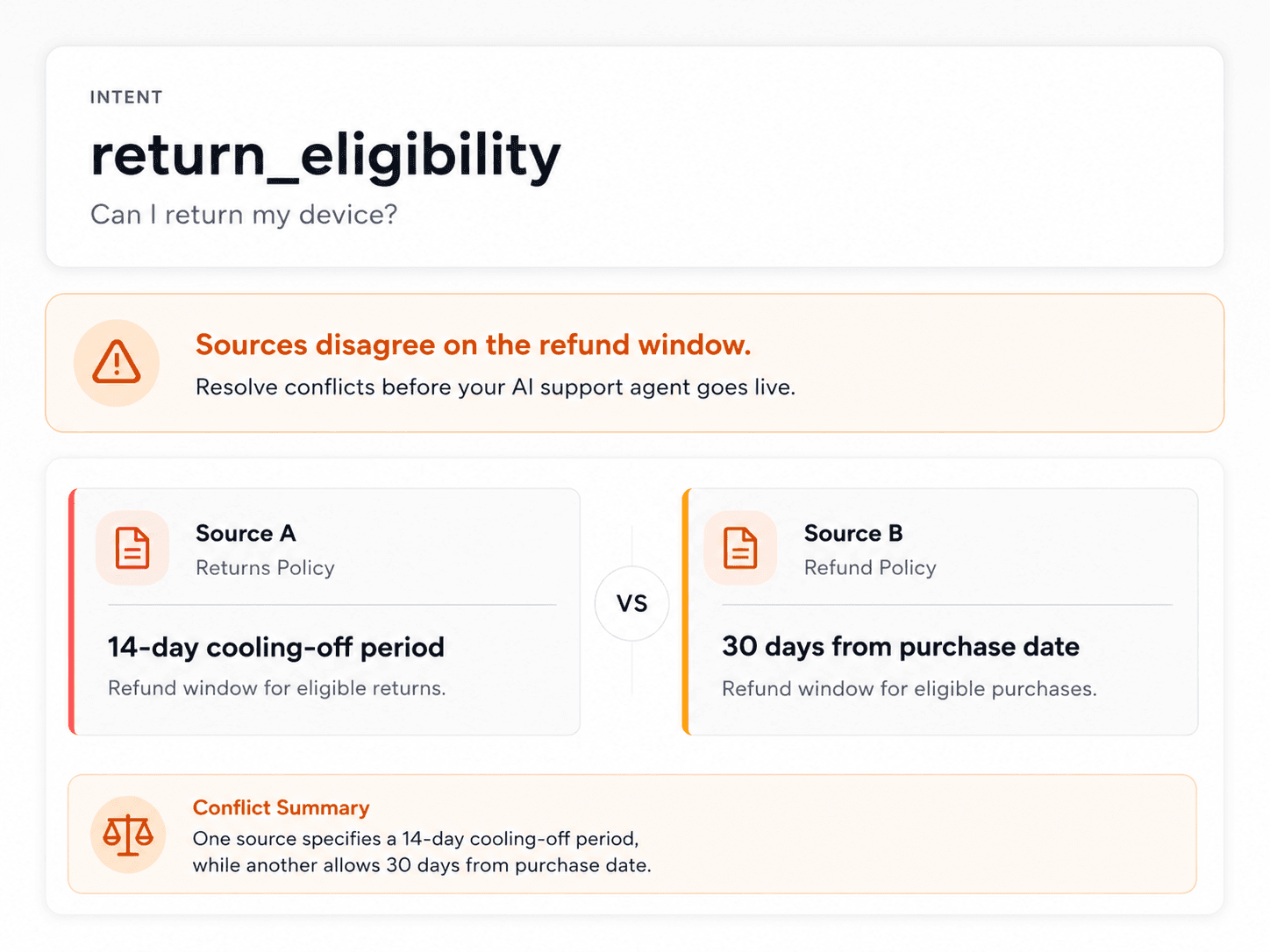
When sources disagree, the intent should be blocked until the team chooses a canonical answer. A model should not be forced to infer compliance policy from contradictory support content.
- Attach canonical source evidence to each approved intent.
- Confirm the source includes conditions, exclusions, and escalation rules.
- Block source conflicts until a policy owner chooses the canonical answer.
- Keep internal-only notes out of customer-facing automation.
Separate information from regulated judgment
Many support questions look simple until the customer asks for a decision. Explaining where to find a policy is different from applying that policy to an account. Explaining how a claim, refund, or dispute process works is different from deciding eligibility.
The compliance checklist should mark the point where an answer moves from general information to regulated, account-specific, or exception-based judgment. That point is usually where the AI should clarify, escalate, or hand off.
This distinction is especially important for fintech, insurtech, healthtech, education, telecom, and marketplaces where customer support can touch rights, payments, identity, safety, or regulated complaints.
- Approve general education separately from account-specific decisions.
- Require human review for regulated complaints and legal threats.
- Restrict answers that depend on customer tier, region, plan, status, or identity.
- Document the exact handoff rule for judgment-heavy topics.
Review data boundaries before connecting sources
AI support compliance also depends on what data the system can read. Before launch, review which sources are connected, what sensitive data appears in them, who can access the workspace, how long evidence is retained, and whether customer content is used for model training.
Support sources often contain private notes, security context, medical or financial hints, complaint details, and internal escalation language. A readiness audit should identify which content can ground customer-facing answers and which content should remain internal.
The safest launch posture is usually read-only source access, minimum practical connector scope, workspace-scoped evidence, and explicit deletion/export paths for account data.
- Grant the smallest practical source scope.
- Separate public answer sources from private internal notes.
- Confirm retention, deletion, and model-training boundaries.
- Limit reviewer access to the teams that need the evidence.
Test security and LLM failure modes
Compliance and security overlap in customer-facing AI. The support agent should resist prompt injection, avoid revealing sensitive information, avoid unauthorized actions, and stop when a customer asks for something outside scope.
OWASP's LLM application risks are useful because they map to real support failures: prompt injection, sensitive information disclosure, excessive agency, insecure tool use, and overreliance. Translate those into support tests, not abstract security scenarios.
For example, test whether the AI reveals internal policy notes, changes account details without the right check, follows customer instructions to ignore policy, or presents an uncertain answer as final.
- Test prompt-injection and policy-override attempts.
- Test sensitive information disclosure from private notes.
- Test action limits for account, payment, refund, and access workflows.
- Treat safe handoff as a passing result for unsafe topics.
Keep an audit trail reviewers can use
Compliance review is much weaker when decisions live in Slack threads or launch meetings. The audit trail should show the customer intent, approved answer, cited source, reviewer, approval timestamp, scope notes, and current status.
It should also show what was not approved. Blocked and human-only topics matter because they prove the team set a boundary instead of letting the AI answer everything by default.
When the source changes, the audit trail should create a retest trigger. A previously approved answer can become unsafe after a pricing update, policy rewrite, support macro change, or vendor model update.
- Keep reviewer, timestamp, source, and status for every approved intent.
- Preserve restricted, blocked, source-fix, and human-only decisions.
- Tie source changes to retest tasks.
- Export the approved answer set for downstream AI agents.
Monitor after launch
Pre-launch review reduces risk, but compliance evidence must continue after the AI is live. Customers ask new combinations of questions, sources drift, and support agents discover gaps that were not in the first test set.
Post-launch review should sample AI-only conversations, escalations, complaints, re-contact, human overrides, and newly blocked intents. The goal is to know what the AI answered that the team would not approve again.
A weekly or biweekly review loop gives compliance and support teams a concrete artifact: which intents stayed approved, which moved to restricted, which were blocked, and which source owners need to fix evidence.
- Track wrong-answer rate by customer intent.
- Track 48-hour or 72-hour re-contact after AI answers.
- Review complaints, legal threats, and regulated escalations.
- Update approved scope when sources or risk posture change.
Checklist
Use this as the working review before launch.
Scope and source
- Every approved intent has a current source of truth.
- Restricted intents list the exact account, region, plan, or status check.
- Conflicted sources are blocked until a policy owner chooses the canonical answer.
- Human-only topics include legal, regulated, identity, payment, security, and exception-heavy work.
Data and access
- Connector scopes are read-only where possible and limited to the audit need.
- Private notes and sensitive internal context are not exposed in customer-facing answers.
- Retention, deletion, export, and model-training boundaries are documented.
- Reviewer access is limited to support, security, legal, compliance, and knowledge owners who need it.
Review record
- Approved answers keep source citation, reviewer, timestamp, and scope notes.
- Blocked and source-fix decisions keep the reason and owner.
- Source, vendor, model, product, and policy changes trigger retesting.
- Post-launch QA tracks wrong answers, re-contact, escalations, complaints, and human overrides.
How Meihaku helps
Turn the checklist into a launch map.
Meihaku reads your sources, maps them to customer intents, drafts cited answers, and shows which topics are ready, stale, conflicting, or blocked.
Related guides
Keep building the launch boundary.
These pages connect testing, knowledge-base cleanup, and readiness scoring into one pre-launch workflow.
Zendesk AI readiness
Meihaku for Zendesk AI
Use Meihaku to audit whether Zendesk Guide, macros, ticket history, and policy documents are ready for Zendesk AI to answer customers.
Vendor pageIntercom Fin readiness
Meihaku for Intercom Fin
Use Meihaku before and alongside Intercom Fin to decide which customer intents are safe to automate, which need source cleanup, and which should stay human-only.
Vendor pageSalesforce AI readiness
Salesforce Service Cloud AI readiness audit
Use this readiness workflow to check whether Salesforce Knowledge, Service Cloud cases, Agentforce actions, and support policies are safe for customer-facing AI.
Vendor pageFreshdesk AI readiness
Freshdesk Freddy AI readiness audit
Use this readiness workflow to check whether Freshdesk solution articles, ticket patterns, Freddy AI Agent knowledge sources, and workflows can safely support AI answers.
Vendor pageHubSpot Customer Agent readiness
HubSpot Customer Agent readiness audit
Use this readiness workflow to check whether HubSpot content, public URLs, tickets, and Service Hub knowledge are ready to ground Breeze-powered customer agent answers.
Vendor pageKustomer AI readiness
Kustomer AI readiness audit
Use this readiness workflow to check whether Kustomer knowledge, CRM context, customer history, and AI Agent workflows can safely support autonomous CX answers.
Vendor pageGorgias AI readiness
Meihaku for Gorgias AI
Use Meihaku to check whether ecommerce support knowledge is ready for Gorgias AI before it handles refund, order, shipping, and product questions.
Vendor pageGoogle Docs readiness
Meihaku for Google Docs
Use Meihaku to audit support policies, SOPs, macros, and FAQ documents stored in Google Drive before an AI support agent relies on them.
Vendor pageZendesk AI checklist
Zendesk macro audit
A checklist for auditing Zendesk Guide, shared macros, ticket patterns, and internal policies before using AI suggestions or customer-facing automation.
TemplateIntercom Fin testing template
Fin batch test CSV
A launch-ready question set for Intercom Fin Batch Test. Upload the question column, then grade each response against source fit, missing policy detail, and safe escalation.
TemplateAI support readiness score
AI Support Readiness Score Methodology
A practical scoring method for support teams deciding whether their knowledge base, policies, tests, and handoff rules are ready for customer-facing AI.
ReadCustomer service QA
Customer Service QA for AI Support
A practical guide for turning customer service QA into an AI support quality program that reviews source evidence, policy safety, escalation, and re-contact risk.
ReadAI agent testing
AI Agent Testing for Customer Support
A support-specific AI agent testing checklist for policy coverage, source citations, stale answers, escalation rules, and launch go/no-go decisions.
ReadHelpdesk AI comparison
Helpdesk AI Vendor Comparison
A practical helpdesk AI vendor comparison checklist for support teams choosing between native helpdesk AI, AI-first support agents, and custom automation.
ReadKnowledge-base audit
Knowledge Base AI Readiness Audit
A step-by-step AI knowledge base audit for finding stale articles, policy conflicts, missing intents, weak citations, and unsafe automation scope.
ReadAI support hallucinations
AI Support Hallucination Examples
A support-specific breakdown of public AI chatbot failures and the readiness controls that prevent policy invention, unsafe handoffs, and brand-damaging answers.
ReadAI support readiness
AI Support Readiness Framework
A practical six-dimension framework for auditing knowledge, policies, testing, handoffs, owners, and metrics before an AI support agent answers customers.
ReadFAQ
Common questions
What is an AI support compliance checklist?
It is a launch-readiness checklist that proves which customer intents an AI support agent may answer, which sources support those answers, what remains human-owned, and how failures are reviewed after launch.
Does this replace legal or compliance review?
No. This checklist organizes the evidence legal, compliance, security, and support teams need. Those teams still decide what is safe for their business and jurisdiction.
What AI support topics should stay human-owned?
Legal threats, regulated complaints, medical or financial advice, identity changes, payment disputes, security incidents, high-value exceptions, and account-specific judgment should usually stay human-owned unless a reviewed workflow exists.
What evidence should we keep before launch?
Keep the customer intent, approved answer, cited source, reviewer, approval timestamp, status, scope notes, blocked-intent reason, and retest trigger.
How does Meihaku help with AI support compliance?
Meihaku maps support sources to customer intents, surfaces gaps and conflicts, preserves citations, and gives reviewers an approved, restricted, blocked, source-fix, or human-only decision before runtime AI answers customers.
Sources
Vendor documentation and public references that ground the claims in this guide.