
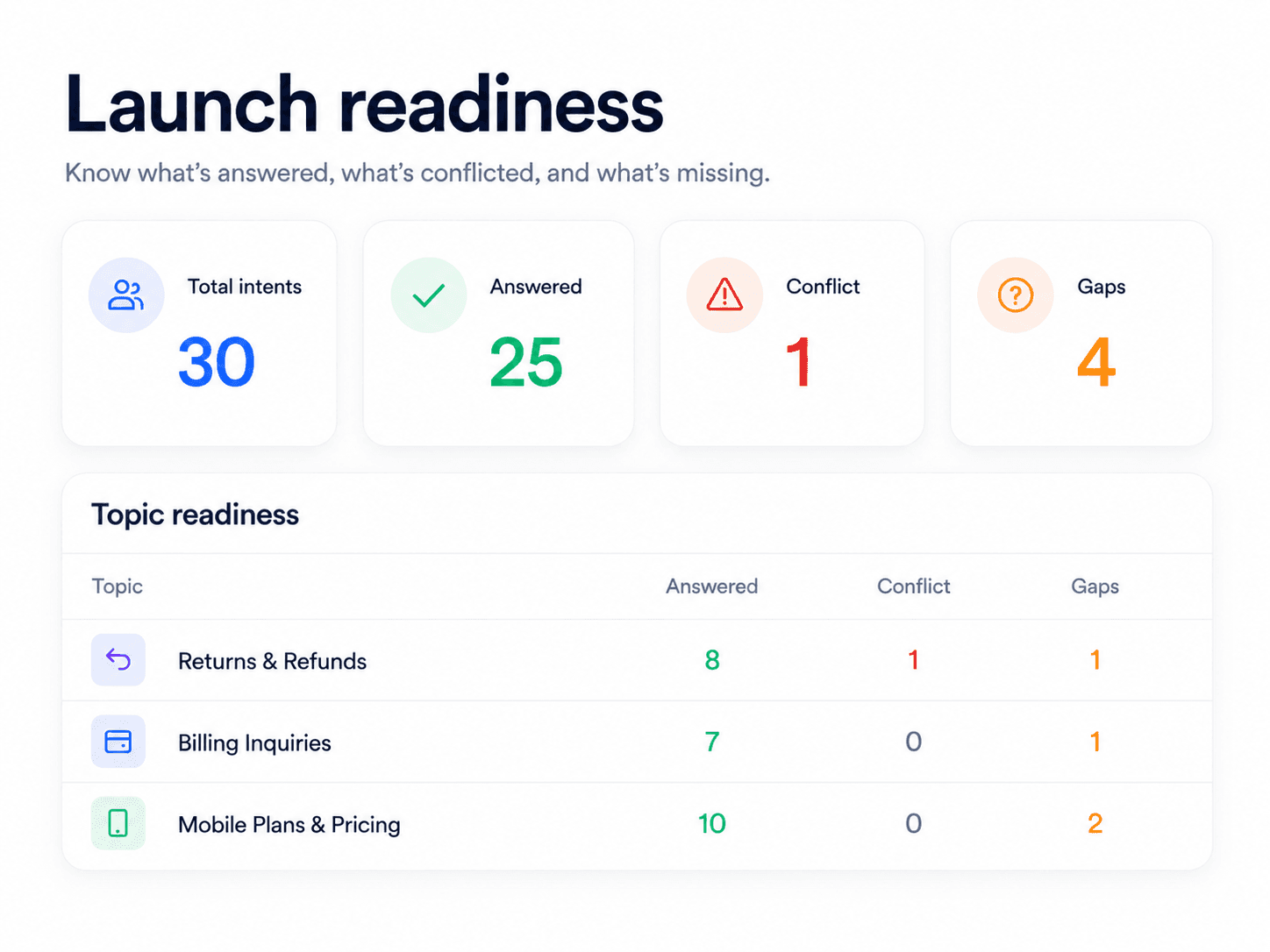
Sample report
AI Support Readiness Sample Report
A sample report page for Meihaku: concrete support risk categories, launch states, source fixes, owners, and retest steps.
Support Readiness Lead, Meihaku · May 11, 2026
A sample AI support readiness report should make the launch decision visible. It should not be a vague confidence score or a list of model evals. The report should say which customer intents are approved, restricted, blocked, source-fix-needed, or human-only.
This page shows what a buyer should expect from a useful readiness report before letting an AI agent answer customers.
Use the structure below as the minimum report shape for a support AI launch review.
What this helps decide
Turn AI Support Readiness Sample Report into launch scope.
Use this guide to decide which customer intents are approved for AI, which need restrictions, which need source cleanup, and which should stay human-owned.
Evidence used
Sources, policies, and support artifacts
- AI readiness score
- Meihaku AI support readiness score
Review output
Approve, restrict, block, or hand off
- Report header
- Report body
- Report action
How this guide was built
2 public references, 5 review areas
- Executive score band
- Approved, restricted, blocked, and human-only intents
- Policy conflict table
Executive score band
The first page should show a score band, not because the score is magic, but because executives need a fast launch decision. The band should be tied to evidence: source coverage, policy conflicts, unresolved intents, escalation clarity, and retest status.
A launch-ready score means approved intents can move forward with monitoring. A pilot-ready score means the rollout should stay narrow. A high-risk score means the support team should fix sources before expanding automation.
- 80-100: launch-ready for approved intents.
- 60-79: pilot-ready with restricted scope.
- 40-59: high-risk and source-fix required.
- Under 40: not ready for customer-facing AI.
Approved, restricted, blocked, and human-only intents
The report should group customer intents by launch state. This is the part a support leader can actually use to configure the AI rollout.
Approved intents have current evidence and clear conditions. Restricted intents need context or clarification. Blocked intents have missing or conflicting sources. Human-only intents require judgement, account control, legal review, complaints, privacy, security, or high-cost exceptions.
- Approved: source-backed and customer-safe.
- Restricted: answer only after required context is known.
- Blocked: missing, stale, or conflicting evidence.
- Human-only: judgement-heavy or regulated support work.
Policy conflict table
The highest-value section is often the policy conflict table. It should show where the help center, macro, SOP, private policy, or recent agent habit disagree.
Each conflict needs a canonical source owner, a customer-safe answer, a retirement or rewrite action, and a retest trigger. Without this table, the AI can synthesize contradictions into a confident wrong answer.
- Customer intent and risk category.
- Conflicting source A and source B.
- Policy owner and decision deadline.
- Retest prompt and launch state.
Source-fix backlog
A readiness report is only useful if it becomes work. The source-fix backlog translates the audit into article updates, macro rewrites, SOP changes, owner review, and vendor test reruns.
This backlog should be sorted by launch impact rather than document count. A single refund contradiction can matter more than twenty low-risk stale screenshots.
- Fix missing answers for high-volume intents.
- Resolve contradictions in refund, billing, privacy, and account policies.
- Rewrite internal-only notes into customer-safe language.
- Add handoff rules for unsupported or account-specific cases.
Retest and monitoring plan
The report should close with retest instructions. Every blocked or fixed intent needs the exact customer phrasing that should be rerun after the source changes.
After launch, the same report becomes a monitoring baseline: wrong-answer rate, re-contact, escalation quality, AI-only CSAT, and new blocked intents should feed back into the same launch-state map.
- Rerun failed prompts after every source fix.
- Track wrong answers separately from deflection.
- Review restricted and blocked intents as backlog.
- Update launch states after policy, product, or vendor changes.
Checklist
Use this as the working review before launch.
Report header
- Score band and launch recommendation.
- Support stack and source systems reviewed.
- Number of customer intents reviewed.
- Date, owner, and next review trigger.
Report body
- Approved, restricted, blocked, source-fix, and human-only intent groups.
- Policy conflicts with source links and owners.
- Missing evidence and stale-source findings.
- High-risk prompts for retesting.
Report action
- Source-fix backlog sorted by launch impact.
- Reviewer approval field for each cleared answer.
- Vendor-specific retest steps.
- Monitoring metrics after launch.
How Meihaku helps
Turn the checklist into a launch audit.
Meihaku reads your sources, maps them to customer intents, drafts cited answers, and shows which topics are cleared for AI, blocked, source-fix needed, or human-only.
Related guides
Keep clearing answers before launch.
These pages connect testing, knowledge-base cleanup, and readiness scoring into one pre-launch workflow.
Intercom Fin readiness
Intercom Fin Readiness Audit
Audit your Intercom Fin rollout before customers see it. See which intents are cleared for Fin, which need source cleanup, and which should stay human-only.
Vendor pageZendesk AI readiness
Zendesk AI Readiness Audit
Audit Zendesk Guide, macros, ticket history, and policy documents before Zendesk AI answers customers.
Vendor pageGorgias AI readiness
Gorgias AI Readiness Audit
Audit your Gorgias AI rollout before it handles refund, order, shipping, and product questions.
Vendor pageFreshdesk AI readiness
Freshdesk Freddy AI readiness audit
Use this readiness workflow to check whether Freshdesk solution articles, ticket patterns, Freddy AI Agent knowledge sources, and workflows can safely support AI answers.
Vendor pageGoogle Docs readiness
Meihaku for Google Docs
Use Meihaku to audit support policies, SOPs, macros, and FAQ documents stored in Google Drive before an AI support agent relies on them.
Vendor pageConfluence readiness
Confluence support knowledge readiness audit
Use this readiness workflow when support policies, troubleshooting articles, SOPs, and internal knowledge base spaces live in Confluence.
Vendor pageAI support risk template
AI support risk register
A CSV risk register for support teams deciding which insurance, telehealth, ecommerce, and cross-industry customer intents can safely be automated.
TemplateAI support readiness template
AI support launch checklist
A vendor-neutral CSV checklist for deciding which customer intents are approved, restricted, blocked, or human-only before an AI support agent goes live.
TemplateZendesk AI checklist
Zendesk macro audit
A checklist for turning Zendesk Guide, shared macros, ticket patterns, and internal policies into approved, restricted, blocked, and source-fix decisions.
TemplateAI support testing tools
Best AI Support Bot Testing Platforms
A shortlist for support teams comparing AI bot testing platforms by the job they solve: runtime simulation, outcome evaluation, adversarial audit, QA, or source readiness.
ReadHamming alternatives
Hamming AI Alternatives
An honest alternatives page for support teams that like Hamming's testing depth but need to decide whether source readiness, outcome evaluation, adversarial audit, or support QA is the better first layer.
ReadAI support readiness score
AI Support Readiness Score Methodology
A practical scoring method for support teams deciding whether their knowledge base, policies, tests, and handoff rules are ready for customer-facing AI.
ReadKnowledge-base audit
Knowledge Base AI Readiness Audit
A step-by-step AI knowledge base audit for finding stale articles, policy conflicts, missing intents, weak citations, and unsafe automation scope.
ReadAI support risk register
AI Support Risk Register
A support-specific guide to using a risk register before AI agents answer insurance, telehealth, ecommerce, and other sensitive customer questions.
ReadAI support hallucinations
AI Support Hallucination Examples
A support-specific breakdown of public AI chatbot failures and the readiness controls that prevent policy invention, unsafe handoffs, and brand-damaging answers.
ReadFAQ
Common questions
What should an AI support readiness report include?
It should include a score band, launch recommendation, reviewed sources, approved and blocked intents, policy conflicts, source-fix backlog, owners, retest prompts, and monitoring plan.
Is a readiness report the same as a model eval report?
No. A model eval report usually scores outputs. A support readiness report decides whether the support operation has enough evidence to let AI answer each customer intent.
Who should read the report?
Support ops, CX leaders, product owners, legal or compliance reviewers, knowledge owners, and the team configuring the AI support agent should all be able to act on it.
Can this report feed other AI testing tools?
Yes. The approved intents, blocked intents, and retest prompts can become input for vendor-native tests, simulation tools, outcome evaluators, and support QA workflows.
Sources
Vendor documentation and public references that ground the claims in this guide.